
Last updated on
Oct 29, 2026

IL UCIA Consent Form free printable template
pdfFiller is not affiliated with any government organization

Fill out
Complete the form online in a simple drag-and-drop editor.

eSign
Add your legally binding signature or send the form for signing.

Share
Share the form via a link, letting anyone fill it out from any device.

Export
Download, print, email, or move the form to your cloud storage.
Why pdfFiller is the best tool for your documents and forms


End-to-end document management
From editing and signing to collaboration and tracking, pdfFiller has everything you need to get your documents done quickly and efficiently.
Accessible from anywhere
pdfFiller is fully cloud-based. This means you can edit, sign, and share documents from anywhere using your computer, smartphone, or tablet.
Secure and compliant
pdfFiller lets you securely manage documents following global laws like ESIGN, CCPA, and GDPR. It's also HIPAA and SOC 2 compliant.
What is IL UCIA Consent Form
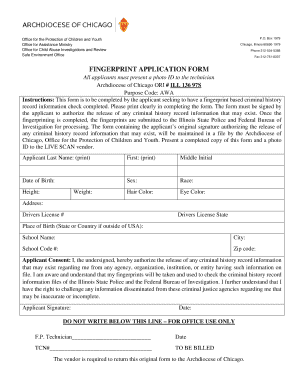
The Illinois Fingerprint Consent Form is a government document used by applicants to authorize a fingerprint-based Criminal History Record Information background check for certification as a Navigator or In-Person Counselor.
pdfFiller scores top ratings on review platforms




Perfect
Worked perfectly! Easy to use.
I love the ease of use and capabilities…
I love the ease of use and capabilities of emailing or printing. Everything I need!
Who needs IL UCIA Consent Form?
Explore how professionals across industries use pdfFiller.

IL UCIA Consent Form is needed by:
-
Individuals applying for Navigator certification
-
In-Person Counselors seeking certification
-
Those undergoing background checks for professional licensing
-
Organizations requiring compliance with insurance department regulations
-
Fingerprint vendors processing background checks
Comprehensive Guide to IL UCIA Consent Form
What is the Illinois Fingerprint Consent Form?
The Illinois Fingerprint Consent Form is a critical document that allows applicants seeking certification as Navigators or In-Person Counselors to authorize a fingerprint-based Criminal History Record Information background check. This form plays a vital role in the certification process by ensuring that necessary background checks are conducted, ultimately aiding the Illinois Department of Insurance in their decision-making. Additionally, it helps standardize the information provided to live scan fingerprint vendors, ensuring compliance with state regulations.
Purpose and Benefits of the Illinois Fingerprint Consent Form
Providing consent through the Illinois Fingerprint Consent Form is significant for maintaining the integrity of the application process. Submitting this form accurately and on time can expedite the certification process, allowing applicants to begin work sooner. Furthermore, it protects both applicants and organizations by ensuring adherence to compliance requirements, ultimately fostering trust within the community.
Who Needs the Illinois Fingerprint Consent Form?
The Illinois Fingerprint Consent Form is necessary for anyone applying for certification as a Navigator or In-Person Counselor. This includes individuals from various sectors, such as healthcare and community service organizations, who must pass a background check. Organizations may also require this form to ensure their volunteers and staff meet the necessary qualifications as mandated by regulatory bodies.
How to Fill Out the Illinois Fingerprint Consent Form Online (Step-by-Step)
Filling out the Illinois Fingerprint Consent Form online is a straightforward process when using platforms such as pdfFiller. To complete the form accurately, follow these steps:
-
Open the form in pdfFiller.
-
Enter your full name in the designated field labeled 'Applicant Name (printed):'.
-
Sign your name in the 'Applicant Name (signature):' field.
-
Add the current date in the 'Date:' section.
-
Review all entered information to ensure accuracy.
By following these steps, applicants can ensure that they fill out the online consent form efficiently.
Common Errors and How to Avoid Them
Many applicants encounter common errors when completing the Illinois Fingerprint Consent Form. These mistakes may include incorrect personal information, missing signatures, or failing to date the form. To avoid these pitfalls, consider the following tips:
-
Double-check all fields for accuracy before submission.
-
Ensure that your signature matches the name provided on the application.
-
Verify that the date is correctly entered.
Addressing these common errors is crucial, as mistakes may delay the certification process or lead to disqualification.
Submission Methods for the Illinois Fingerprint Consent Form
Applicants can submit the completed Illinois Fingerprint Consent Form through various methods, including online via pdfFiller or by mailing a physical copy. The online submission method allows for a more streamlined process and ensures security. Be sure to check any specific instructions provided by the Illinois Department of Insurance to ensure compliance with submission guidelines.
Fees, Deadlines, and Processing Time for the Illinois Fingerprint Consent Form
When preparing to submit the Illinois Fingerprint Consent Form, applicants should be aware of associated fees, which may include those for fingerprint verification. It is essential to adhere to any deadlines set forth in the certification process to avoid delays. Typically, processing time for the form can vary, but applicants should expect a defined turnaround period after submission.
What Happens After You Submit the Illinois Fingerprint Consent Form?
After submitting the Illinois Fingerprint Consent Form, applicants will enter the review process. They can expect updates on their application status as it moves through the certification process. It is essential to remain proactive by checking for updates and understanding any follow-up actions that may be required based on the results of the background check.
Importance of Security and Compliance for the Illinois Fingerprint Consent Form
Security is a vital aspect when handling the Illinois Fingerprint Consent Form. Using platforms like pdfFiller ensures that all submissions are protected with robust security features, including 256-bit encryption. Compliance with privacy laws, such as HIPAA and GDPR, is also maintained, ensuring the confidentiality of the information submitted within the form.
Using pdfFiller for Your Illinois Fingerprint Consent Form Needs
Using pdfFiller for the Illinois Fingerprint Consent Form allows for an easy filling, editing, and signing process. Key features such as cloud-based access and eSign capabilities streamline the overall experience for applicants. Moreover, the platform’s commitment to document security and compliance helps users feel confident about their submissions.
How to fill out the IL UCIA Consent Form
-
1.To access and open the Illinois Fingerprint Consent Form on pdfFiller, visit the pdfFiller website and use the search feature to locate the form by typing its name.
-
2.Once you have found the form, click on it to open the document for editing. Familiarize yourself with the layout and available tools on pdfFiller.
-
3.Before filling out the form, ensure you have all necessary information at hand, such as your personal details, identification numbers, and any relevant reference numbers related to your certification.
-
4.Begin by entering your name in the fields marked 'Applicant Name (printed)' and 'Applicant Name (signature)'. Use clear, legible text.
-
5.For the date, select the current date from the date picker tool or enter it manually in the designated field.
-
6.As you complete each field, check for any pre-filled information that may be provided or additional checkboxes that need to be checked based on your specific circumstances.
-
7.After finishing your entries, take time to review all information for accuracy and completeness. Ensure that each required section is filled out correctly.
-
8.Once you are satisfied with the details provided, you can save your progress within pdfFiller to prevent loss of data.
-
9.To finalize the form, click the 'Download' button to save a copy to your device, or use the 'Submit' option if you need to send it directly to a specific recipient.

Who is eligible to use the Illinois Fingerprint Consent Form?
The Illinois Fingerprint Consent Form is for individuals applying for certification as Navigators or In-Person Counselors who require a background check through the Illinois State Police.
What is the deadline for submitting the fingerprint consent form?
Deadlines may vary depending on the specific licensing or certification process. It is advisable to submit the form as early as possible to allow time for processing.
How should I submit the Illinois Fingerprint Consent Form?
You can submit the completed form to designated agencies, such as the Illinois Department of Insurance, or provide it to your fingerprint vendor as instructed.
What supporting documents do I need to submit with the form?
Generally, you will need to provide identification and any relevant reference documents related to your certification application along with the consent form.
What common mistakes should I avoid when filling out this form?
Ensure that all fields are filled out completely, double-check for any spelling errors, and confirm that your signature and date are correctly provided before submission.
How long does it take to process the fingerprint consent form?
Processing times may vary based on the Illinois State Police's workload. Typically, allow several weeks for results to be returned after submission.
What do I do if I have questions about the fingerprint check results?
For questions regarding the results of your fingerprint check, contact the Illinois State Police or the agency that processed your background check for assistance.
Related Content
Related Forms




Related Catalogs
Get the latest insights from our blog


If you believe that this page should be taken down, please follow our DMCA take down process
here
.
This form may include fields for payment information. Data entered in these fields is not covered by PCI DSS compliance.